Locking by itself
JayLocked locks the moment you leave it, or after one or five minutes if you prefer. It hides its contents from recordings as far as each system allows.
On
 iPhone and iPad
 Android
- MacIn part
 WindowsIn part
Lock the vault in Settings has three choices: When I leave JayLocked, After 1 minute and After 5 minutes. JayLocked starts on the first, so the vault closes the moment you go elsewhere. A longer time is granted only after the vault passcode.
Whatever you chose, the vault locks at once when you press Lock, when a phone locks or its screen turns off, and when a computer goes to sleep, turns off its display or is locked.
On a phone, When the phone is face down adds one more way: lay the phone on its screen and the vault locks, and, if you choose so, the browser opens over JayLocked as well.
- The face-down lock is off until you choose Lock the vault or the choice that also opens the browser. Going back to Do nothing asks for the vault passcode.
- System screens that JayLocked opens itself, such as the photo picker, the file chooser or the camera, do not lock the vault.
- When the vault locks, music and video stop, and so does a backup or an export that is running.
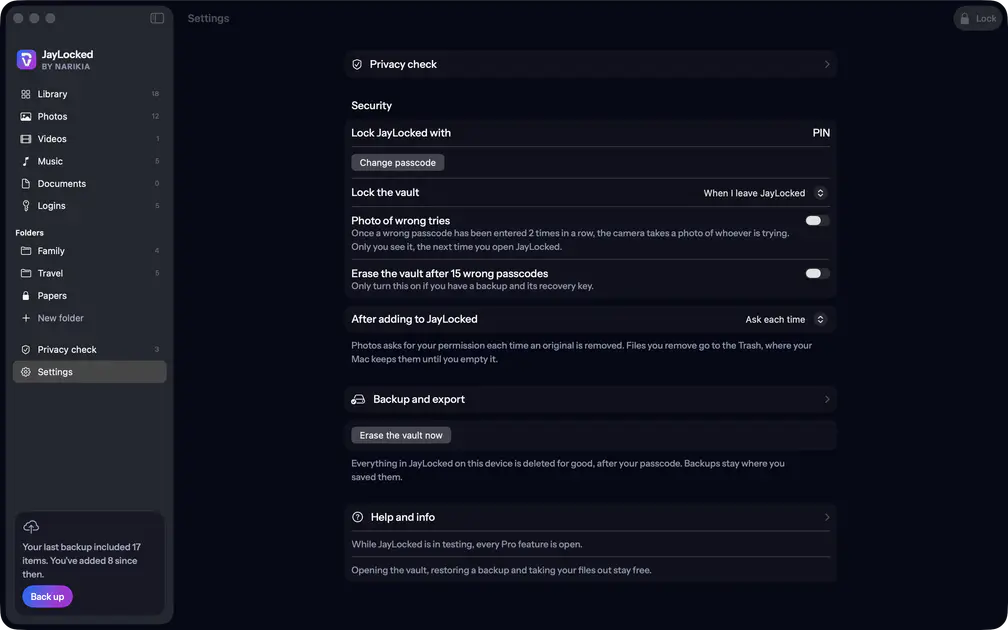 Mac

What differs from system to system
- iPhone and iPad
- A plain cover hides the vault in the app switcher and while the screen is recorded, shared or mirrored. The face-down choice that opens the browser reads Lock and open Safari.
- Android
- Android blocks screenshots and recordings of JayLocked, and the list of recent apps shows nothing of it. A picker or the camera that JayLocked opened keeps the vault open for 300 seconds at most, and the face-down choice that opens the browser reads Lock and open the browser.
- Mac
- Leaving means another app in front, JayLocked hidden or its window in the Dock, and the screen saver or another person signing in locks the vault too. There is no face-down lock, and JayLocked asks macOS to keep its windows out of screenshots, recordings and shared screens, which macOS may not honour for every way of capturing.
- Windows
- Leaving means another window in front or JayLocked minimised, and closing the window locks the vault first. There is no face-down lock, and JayLocked asks Windows to leave its window out of screenshots, recordings and shared screens.
Where it ends
- iOS lets no app block a screenshot. On iPhone and iPad a still screenshot of an open item stays possible.
- With After 1 minute or After 5 minutes the vault stays open that long after you leave it. The privacy check points this out.
- The face-down lock exists on iPhone, iPad and Android, and it acts only while the vault is open.