Erase the vault
JayLocked can erase its vault after a run of wrong passcodes, if you turn that on, and erases it at once when you ask and enter your passcode.
On
 iPhone and iPad
 Android
- Mac
 Windows
A switch in Settings makes JayLocked erase the vault after 15 wrong passcodes in a row on the lock screen. It is off until you turn it on. Turning it on asks nothing, and turning it off asks for the vault passcode.
Erase the vault now in Settings removes the vault and all its keys from this device as soon as your passcode is entered, with no further question. JayLocked then returns to its first screen, where a vault can be set up or a backup restored.
- With the switch on, the lock screen warns when only a few wrong tries are left before the vault is erased.
- Wrong recovery keys never erase the vault.
- Backups you saved elsewhere are not touched. With one of them and its recovery key, Restore a backup on the first screen brings everything back.
- Erasing removes the keys first. Without them nothing left on the device can be decrypted, even if the rest of the deletion is cut short.
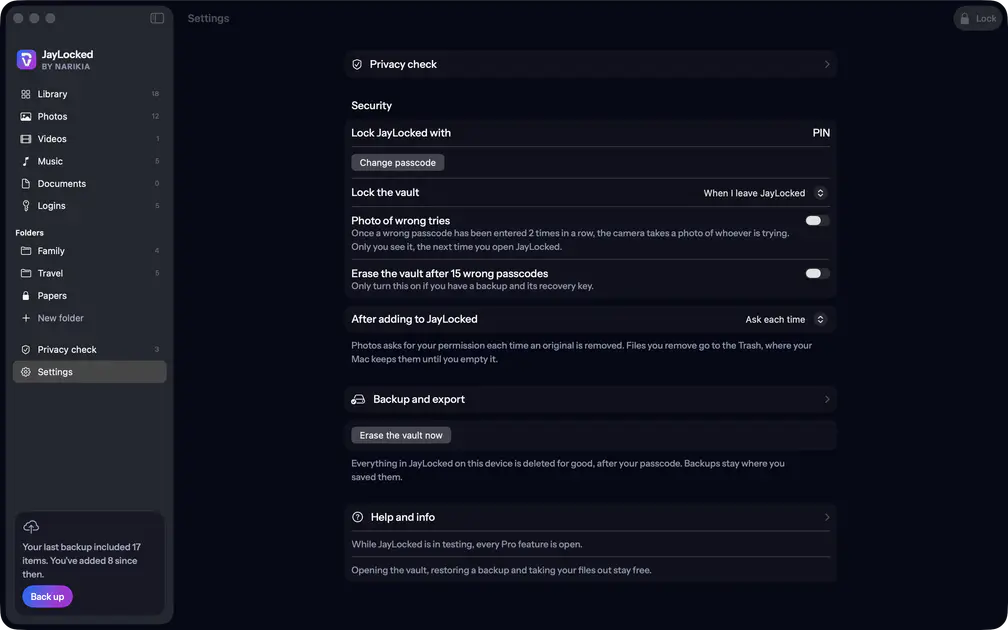 Mac

Where it ends
- Erasing cannot be undone. Without a backup kept somewhere else and its recovery key, what was in the vault is gone.
- JayLocked's own advice about the switch is to turn it on only if you have a backup and its recovery key.